A PartialGrid represents a detached rectangular block of cells — including data, styles, and borders — that can be extracted from or applied to a worksheet. It is the underlying mechanism for clipboard operations, the SetPartialGridAction, and pattern-repeating fills.
Namespace
using unvell.ReoGrid;Creating a PartialGrid
Constructors
| Constructor | Description |
|---|---|
PartialGrid() | Create an empty partial grid |
PartialGrid(int rows, int cols) | Create an empty partial grid with the specified capacity |
PartialGrid(object[,] data) | Create a partial grid filled with data from a 2D array |
// From a 2D array
var grid = new PartialGrid(new object[,] {
    { "Name", "Price", "Qty" },
    { "Apple", 1.20, 50 },
    { "Banana", 0.80, 30 },
});
Properties
| Property | Type | Description |
|---|---|---|
Rows | int | Number of rows in the partial grid |
Columns | int | Number of columns in the partial grid |
Extracting from a Worksheet
Use GetPartialGrid to copy a block of cells from the worksheet. The returned PartialGrid contains data, styles, and borders.
GetPartialGrid Overloads
| Signature | Description |
|---|---|
GetPartialGrid(string addressOrName) | Get by address or named range |
GetPartialGrid(int row, int col, int rows, int cols) | Get by position and size |
GetPartialGrid(RangePosition range) | Get by range position |
GetPartialGrid(int[] columns, int[] rows) | Get non-contiguous columns and rows |
// Copy a block from A1:C3
PartialGrid block = sheet.GetPartialGrid("A1:C3");

// Copy by position
PartialGrid block = sheet.GetPartialGrid(0, 0, 3, 3);

// Copy specific columns and rows (non-contiguous)
PartialGrid block = sheet.GetPartialGrid(
    new int[] { 0, 2, 4 },   // columns A, C, E
    new int[] { 0, 1, 2 });   // rows 1, 2, 3
Applying to a Worksheet
Use SetPartialGrid to paste a partial grid into the worksheet at a target position. This overwrites the target range with the partial grid’s data, styles, and borders.
SetPartialGrid Overloads
| Signature | Return | Description |
|---|---|---|
SetPartialGrid(string addressOrName, PartialGrid data) | RangePosition | Paste at the address or named range |
SetPartialGrid(RangePosition toRange, PartialGrid data) | RangePosition | Paste at the range position |
// Copy from one location to another
var block = sheet.GetPartialGrid("A1:C3");
sheet.SetPartialGrid("E1", block);
The returned RangePosition is the actual range that was filled.
Repeating a Pattern
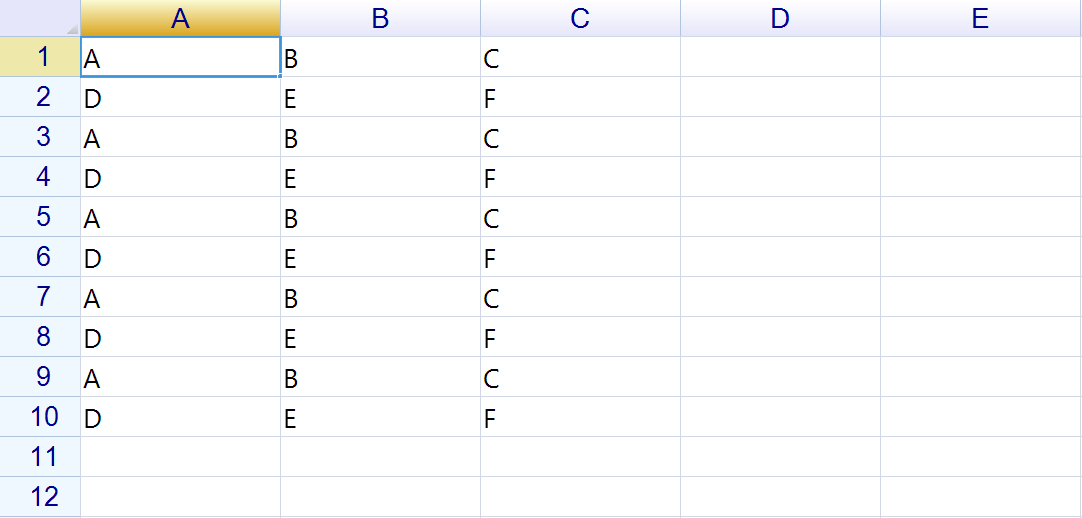
Use SetPartialGridRepeatly to tile a partial grid across a larger range. The partial grid is repeated to fill the target range.
SetPartialGridRepeatly Overloads
| Signature | Return | Description |
|---|---|---|
SetPartialGridRepeatly(string addressOrName, PartialGrid grid, PartialGridCopyFlag flags) | RangePosition | Repeat at address |
SetPartialGridRepeatly(RangePosition range, PartialGrid grid, PartialGridCopyFlag flags) | RangePosition | Repeat at range |
// Create a 2-row pattern
var pattern = new PartialGrid(new object[,] {
    { "A", "B", "C" },
    { "D", "E", "F" },
});

// Tile the pattern across a 10-row range
sheet.SetPartialGridRepeatly("A1:C10", pattern);
PartialGridCopyFlag
The PartialGridCopyFlag enum controls which elements of the partial grid are copied.
Individual Flags
| Value | Hex | Description |
|---|---|---|
CellData | 0x1 | Cell data values |
CellFormula | 0x2 | Cell formulas |
CellFormat | 0x4 | Data format settings |
CellStyle | 0x8 | Cell styles |
HBorder | 0x10 | Horizontal borders |
VBorder | 0x20 | Vertical borders |
Composite Flags
| Value | Combines | Description |
|---|---|---|
CellProperties | CellData | CellFormula | CellFormat | CellStyle | All cell properties |
Borders | HBorder | VBorder | All borders |
All | CellProperties | Borders | Everything (default) |
// Copy only data and formulas (no styles or borders)
sheet.SetPartialGridRepeatly("A1:C10", pattern,
    PartialGridCopyFlag.CellData | PartialGridCopyFlag.CellFormula);
Using with Actions
The SetPartialGridAction provides undo/redo support for pasting partial grids:
using unvell.ReoGrid.Actions;

var block = sheet.GetPartialGrid("A1:C3");
sheet.DoAction(new SetPartialGridAction(
    new RangePosition("E1:G3"), block, PartialGridCopyFlag.All));

// Undo the paste
grid.Undo();
Comparing Partial Grids
bool isEqual = grid1.Equals(grid2, PartialGridCopyFlag.All);
bool dataOnly = grid1.Equals(grid2, PartialGridCopyFlag.CellData);
Examples
Copy and Paste a Block
// Copy header row with styles
var header = sheet.GetPartialGrid("A1:F1");

// Paste into another worksheet
var sheet2 = grid.Worksheets[1];
sheet2.SetPartialGrid("A1", header);
Create a Repeating Template
// Define a styled template row
var template = sheet.GetPartialGrid("A1:D2");

// Apply it across 20 rows
sheet.SetPartialGridRepeatly("A3:D22", template);
Selective Copy
// Copy only styles (no data)
sheet.SetPartialGridRepeatly("A1:D10", template,
    PartialGridCopyFlag.CellStyle | PartialGridCopyFlag.Borders);
Related Topics
- Range — Range positions and operations
- Built-in Actions —
SetPartialGridAction - Clipboard — Clipboard operations using partial grids