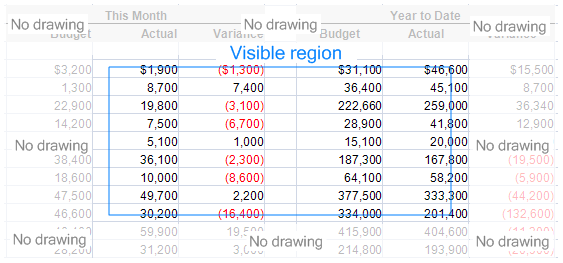
Speed and a small memory footprint have always been core goals of ReoGrid development. Even as more features have been added, various technologies are used to optimize performance and enhance the user experience.
Everything is fast
Expanding a worksheet from 100 rows to 100,000 rows takes only 8 ms (0.008 seconds).
Updating 100,000 cells takes just one second, meaning each individual cell update takes only 0.01 ms — extremely fast.
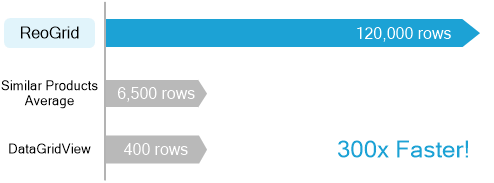
Why ReoGrid is fast
The following technologies are used to improve and enhance performance.
Optimized Memory Management
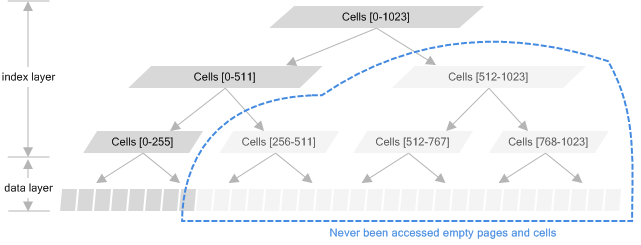
ReoGrid uses an optimized memory management strategy to improve cell memory usage. This technique splits a large spreadsheet into many smaller sheets organized as a tree structure in memory. Memory allocation and release are performed on these small paged sheets, achieving a good balance between time and memory usage.
Optimized Border Algorithm
A spreadsheet may contain many cell borders that must be managed in memory and rendered on screen. To maximize rendering performance, ReoGrid only draws borders in the visible region. An algorithm maps the visible region to the borders, making it possible to quickly determine where to start drawing, regardless of the spreadsheet size.
Optimized Viewport Algorithm
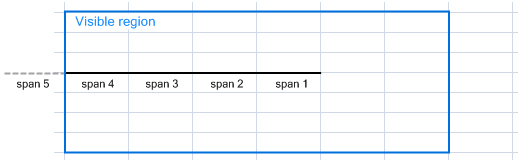
ReoGrid uses an algorithm to manage and render visible regions, which supports the freeze, outline, and print features. Each viewport operates independently and can be scaled or scrolled independently. This algorithm maximizes performance when calculating the rendering region, optimizing text rendering and graphics drawing.